7/20/2012

Easy Way to Fix Shockwave Flash Crash in Internet Browser


When a Shockwave Flash crash occurs, the videos cannot play on the Internet. It may be caused with the Shockwave Flash plugins or other settings in your Windows. In this article we will introduce some easy ways to fix Shockwave Flash Crash in InternetBrowser.

Generally, the plugins include various active-xcomponents and they may conflict with each other to lead to Flash content crashes on the Internet browser. The first thing you need to do is to check if the Shockwave Flash crash occurs on all your Internet browsers or just one browser.

If the Shockwave Flash Crash happens in one browser, you need use some powerful Windows registry repairing solution or programs to fix the Windows Registry.
If the Shockwave Flash Crash happens on all of your Internet browsers, do any of the followings to fix it:
a) Uninstall the Adobe Flash Player Active-X and its plug-in components and reinstall Shockwave Flash Player.
b) Go to Adobe official website to download the latest version of Adobe Flash Player.
c) Update the computer drivers for software or hardware on PC.
d) Your sound drivers may also cause Shockwave Flash Crash. The following steps can solve it:
* Open device manager
* Search the sound-card device and write down the device name
* Uninstall the device and restart your computer
* If your computer is Windows 7 or Windows Vista, it will automatically download and reinstall the sound driver. You can also download the sound driver from sound card company official website and reinstall it by manual.
e) To solve common computer errors and crashes, using some Windows Registry Fixer software such as Acebyte Utilities to fix your Windows Registry is always a good and highly recommended method. Acebyte Utilities works not only as a powerful Windows Registry Fixer or Registry Cleaner, it could also help to speed up your computer and improve your system performance to let your PC run as a new one again!

7/17/2012

How to Back Up Drivers in Windows Vista by Acebyte Driver Backup Freeware


Drivers play important roles in the connection between your hardware devices and computer. What if you lost all of your CDs together with the drivers provided in the box? Well, you can always download these drivers from the manufacture website, however, there could be times when it is not possible, say an old driver and the manufacture is no longer in business. How to back up and reuse drivers in Windows Vista? Here the free driver backup software Acebyte Utilities is high recommended.
Guide on how to backup drivers in Windows Vista using Acebyte Utilities driver backup program:
Driver backup step 1: Click link above to free download Acebyte Driver Backup Freeware, install it on your Windows Vista computer and run it.
how to back up drivers in vista by acebyte driver backup
Driver backup step 2: To open Driver Backup utility: click Utilities Box > Repair >Driver Backup.
how to back up drivers in vista in driver backup program
Driver Backup Step 3: All hardware device drivers will be listed by Acebyte Data Backup program. Select the specific drivers you want to back up one by one, or click to select All.
Driver Backup Step 4: Start driver backup by pressing Backup button.
Several minutes later, everything will be done.

7/12/2012

Convert Video Files to iPhone 4 with Ease


As one of the Apple family, iPhone 4 is known as a most-welcomed cell phone for its incomparable entertainment functions. Watching wonderful movies in its 3.5-inch screen is also the favorite enjoyment for iPhone fans. iPhone Video Converter from BlazeVideo also does a good job as its name implied to convert almost all video files to iPhone 4. Now let’s see how it works:

Convert Video Files to iPhone 4 Step 1:

Free download this best iPhone video converting tool, install it on your Windows computer and run it.

Convert Video Files to iPhone 4 Step 2:

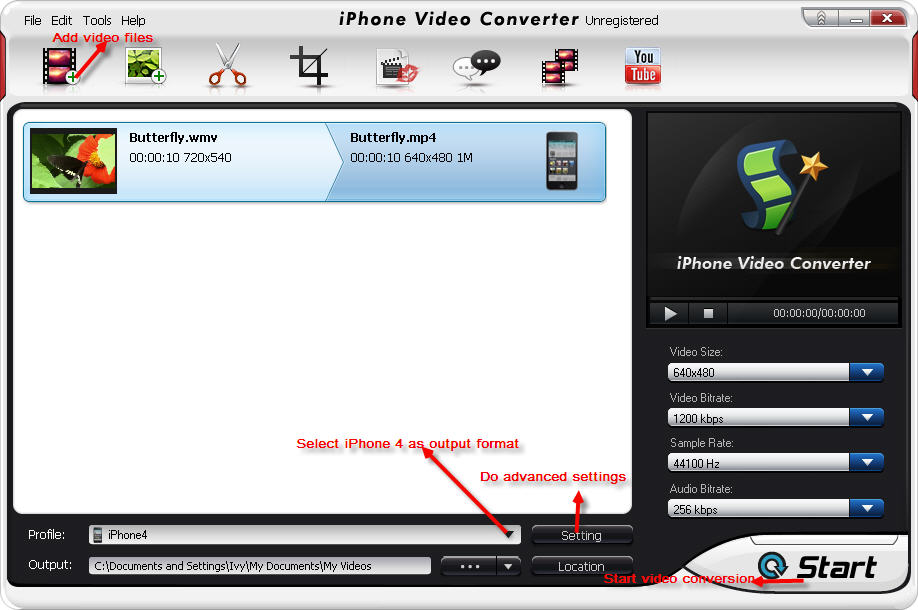
Click “Add video file(s)…” button to insert the video you want to convert to iPhone 4. Drop down “Profile” to choose “iPhone4” as output video format. Click “Browse” button to choose the output location where you want to save your converted video file for iPhone 4. Click “Setting” button, the video converter professors can do some advanced settings on the video and audio parameter like codec, size, sample rate, frame rate, bitrate, channel, etc.
convert video files to iphone 4

Convert Video Files to iPhone 4 Step 3:

Click “Start” button. Wait a few seconds, this iPhone Video Converter will complete the left of video to iPhone 4 conversion for you.

7/06/2012

How to Download Youtube Videos to iPhone&iPod


Youtube hot videos really bring us countless joy. In person, I am a royal Youtuber. I almost spend more than 5 hours on watching Youtube videos everyday. When I meet good or interesting Youtube videos, I will download them and then save on my iPhone. I want to enjoy them when I feel bored, such as in the train or bus.
To download Youtube videos to iPhone or iPod is very easy. Firstly, you need to download videos from Youtube. And then you need to convert the videos for iPhone or iPod. Both of these two steps can be done by using one software – BlazeVideo iPhone Flick. Now I will show you step by step.
Step One: Start Youtube Downloader and Converter – iPhone Flick.
Download BlazeVideo iPhone Flick, install and run it.
Step Two: Download YouTube videos
Click “YouTube” button on BlazeVideo iPhone Video Converter to turn to “Video Download” window:
convert videos to iPhone
Step Three: Convert Videos to iPhone or iPod
Drop down “Profile” tab to choose output video format. Click “Start” button to convert the downloaded FLV video to MP4 for iPhone or iPod instantly.
In addition, here is a video which can help you to learn how to convert videos by using iPhone Flick.

7/02/2012

Make a Professional Movie for iPad/iPad 2 on Your Own


iPad and iPad 2 are great devices to watch videos. The iPad users watch 3 times as much video as regular web users. It is more convenient to watch videos, movies on a tablet rather than on a notebook or computer. You can take videos along with you and enjoy it at anytime anywhere.
If you have videos shot with another device, like a camera, you probably want to get it playing on the iPad/iPad 2 or working with iMovie. Do you want your video to be as professional as studio produced films? Then, you can make movie for iPad/iPad 2 on your own by using video editing tool. To achieve this goal, you need to edit these recorded video clips and convert the footages into the right format, then introduce it gently to iPad/iPad 2.
Guide on How to Make Movie for iPad/iPad 2
The trick is to edit the video files and turn the files into a specifically crafted MP4 with the H.264 codec. First, download iPad Video Converter and install it on Windows computer.
Step 1. Import Videos
Run iPad Video Converter. Import all the video clips by clicking “Add File(s)”, and then they will appear on the source panel.
Step 2. Edit Videos

From the above entry, you can edit videos and make a unique movie.
Clip: Clip video segments as you want from one video file. Just set the start point and end point.
Crop: Crop the video frame to make it suitable for the iPad display by dragging the red points. The black bars will be removed.
Watermark: Add your favorite text in the watermark box and drag the text to change the position. This feature will help you state your copyright.
Subtitle: Enable the plug-in subtitle by adding the *.srt file to make your video more professional.
Merge: At last, join all the clips into one video file. You can also include title and credits to make it a studio produced film.
Step 3. Convert to iPad/iPad 2
Till now, you get one unique movie, and then choose the iPad or iPad 2 from the Profile drop-down list. Click “Start” button on the lower right corner to start converting your self-regulating movie to iPad/iPad 2.

6/29/2012

Does DVD Copy Really Care


This is the question I have been thinking all this week. Does DVD Copy really care? Many people think that dvd copy software will harm dvd original creators' intrests and make them to suffer from great loss. But from another aspect, the dvd disks are sold in such a high price. Is it not another great loss for us? Take myself as an example. I am only with several hundreds of dollars income. How should I pay for dozens of dollars to buy dvd disks that can only be seen for one or two times. It does not deserve that high price. I can save lots of money if I buy pirate DVDs. Although I do not like money, I also do not hate them.

There are many online stores that live on selling dvd copy softwares. Are they legal or illegal? I am not a lawyer. I do not know how to say. But as a simple consumer, I love these stores. They save me lots of money and time. Thanks. Really.

There are some basic features that most DVD copy softwares have. Firstly, they allow you to copy dvd to dvd, ISO and mobile devices. Secondly, many powerful dvd copy softwares allow you to convert video formats directly. After converting, you can enjoy the videos anywhere and anytime.

As for me, the most important feature I care is copying speed. Life is so good. I have so many things to do everyday. I do not want to waste time on doing meaningless things. If a dvd copying software is with very fast copying speed and powerful video converting functions, I will buy it. It is the right one that I am looking for.

I usually heard from some friends that China is the greatest source for pirate DVDs. But I want to say it is because we are poor. We do not have the ability to spend money on enjoying expensive movies and musics. We can watch a 3D movie in cinema by costing less than 10 dollars. So do you think we will buy a single dvd disk with 20 dollars. What is more, many people only watch movies for one time. Some people like reenjoying classics while others not. As for people who only watch movies for one time, why they should buy such expensive dvd disks?

Actually speaking, I also hate pirate and replica products in person. But sometimes I just can not live without them. We are often forced by the real life.

This article is originally written by Helen Zhang. All you friends are allowed to reproduce and republish the article. But before reposting it, please be sure to indicate the source, including Author name, Article link, etc.

6/26/2012

Computer Hard Drive Recovery


Killed a hard drive without backing up? Deleted your top-secret files and already emptied the recycling bin? It’s not a problem any more! You can definitely recover computer hard drive with the help of this guide.
Why the hard drive data can be covered?
First, believe a fact that whether the hard drive loss is caused by a logical failure or a mechanical one, there is a good chance that the data can be recovered successfully.
If a logical failure occurs, the lost drive data may still reside on the disk, but simply can’t be accessed. For example, when a file is deleted, the data is not actually erased from the hard drive; rather, the spot where the file was stored is allocated focomputer hard drive recoveryr reuse. Until that spot is actually used for storing new information, the data that was deleted is still recoverable. That’s why we say it is possible to retrieve the lost data.
In a mechanical failure, it is possible that all of the data is present and intact on the hard drive, but because the actual mechanism inside the drive is physically damaged, the data simply can’t be accessed. Physical hard drive repair is a very delicate operation, much like a surgery, and if proper precautions are not taken, the operation could become a disaster. That’s the reason why it’s so crucially important to find a data recovery specialist you can trust.

WHAT SHOULD I DO IF A DATA LOSS HAPPENS?

Turn off and stop using your computer or hard drive immediately. Remember that any further use may endanger your data beyond anyone’s ability to recover. If the hard drive is connected to your computer, never try to power on or restart your computer. Disconnect the computer or hard drive from power. Computer professors always tell us :”Stopping all use of the damaged equipment or medium is the single most important step in any data loss scenario.”
Never try to perform the hard drive data recovery on your own. Especially if you are not absolutely sure of what you are doing, any personal operation will be dangerous. Also, do not attempt to use the “hard disk data recovery software” and disassemble the hard drive on your own. For these may make the data recovery process more difficult or destroy the hard drive even worst.
Ask the data recovery professors or companies for help. Contact your local data recovery companies. Usually they have the most experience, the best tools and even the brightest minds to ensure the data recovery operation safe and successful.

6/21/2012

How to Make a Photo Video Slideshow


Do you have a lot of photos for your family, friends or special events? Slideshows are an attractive way to share and organize groups of photos with your friends and family as well as back up the wonderful memories in your life. In this article, see how to make a photo video slideshow in BlazeVideo Video Magic, a best all in one video editor+ video converter + video maker tool for Windows 7, Windows Vista or Windows XP.
Step-to-step Guide to Make a Video Slideshow with Video Mmagic

Step 1 Has Video Magic correctly on your computer.

Free download this great video converter, install it by following the installation wizard and click its icon to start up it. If you are a paid user, do not forget to click “Register” button to copy and paste your license code for registration. It will request to re-launch after successful registration before using Video Magic.
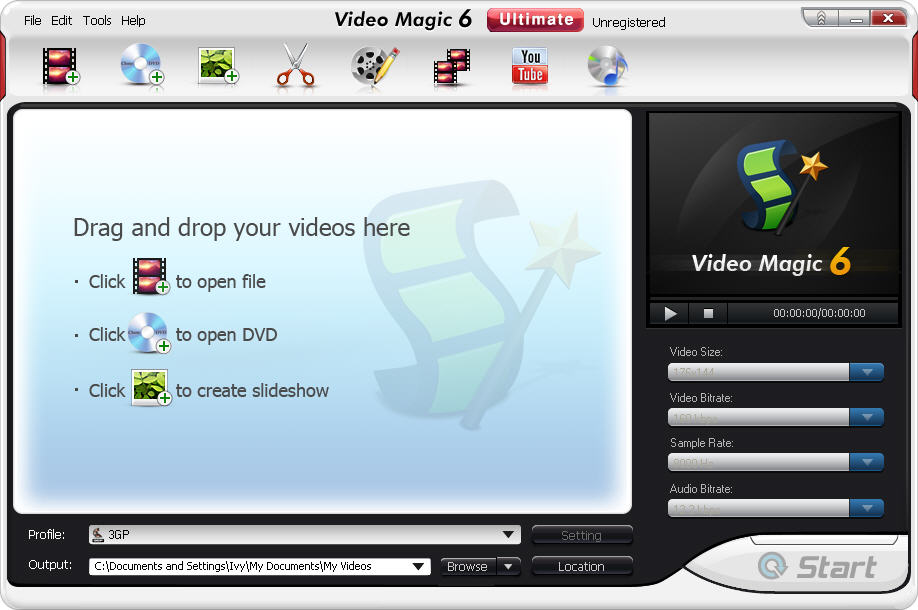
photo slideshow maker

Step 2 Select the photos for your video slideshow.

Click “Slideshow” button to turn to “Slideshow” window. And then click “Add” button in “Slideshow” window to pick up your favorite photos from your photo collection on hard drive.

Step 3 Custom your photo slideshow.

There are several options available in Video Magic to custom your photo slideshow easily. Go to show yourself now!
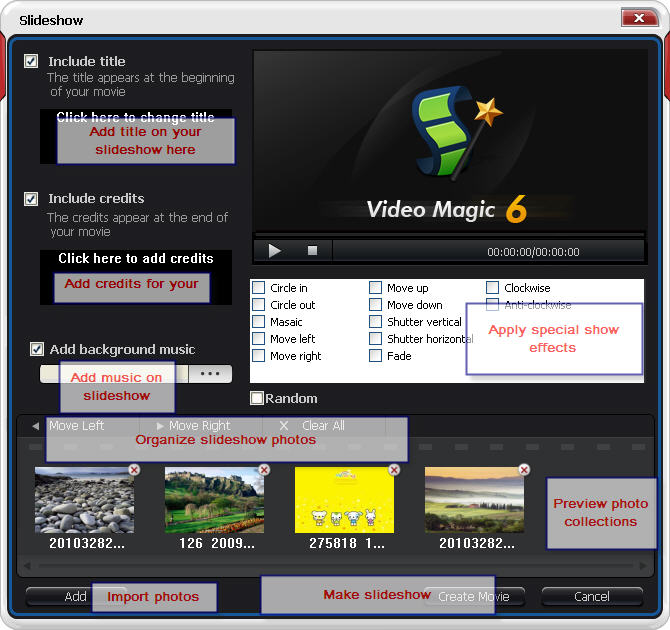
Insert your own title: move your mouse to make “Include title” selected and type in your prepared title in the “Click here to change title” area. This title will be shown at the beginning at your slideshow video.
Add your own credit: move your mouse to make “Include credits” activated and write down your credits in the “Click here to add credits” area. The credits you add will appear at the end of your slideshow movie.
Apply special show effects: there are 12 show effects provided by Video Magic for your choice: circle in, circle out, masaic, move left, move right, move up, move down, shutter vertical, shutter horizontal, fade, clockwise, anti-clockwise. With these show effects, you can work as a actor to make your own slideshow movie.
Add music to the slideshow: click “Brose” button to load your loved music song to your slideshow. Look at the picture below to see more specific information:
make a photo slideshow in video

Step 3 Create slideshow.

When the personal settings are done, click “Create Movie”. You will go back to the main interface of Video Magic and your slideshow file will be displayed in the working area.

Step 4 Convert the slideshow for more devices.

Select output video format: drop down your preferred video format for loved popular devices in the device list.
Do advanced settings: click “Settings” button to do more settings on your output video resolutions like vise size, bitrate, sample rate, codec, channels, and more, in order to get perfect video file with high quality in both video and audio, thus greatly enhance your enjoyment on device.
Select definition folder: click “Browse” to choose a folder with enough free space as the output definition.
OK, everything is ready, click “Start”.
photo to video slideshow

6/20/2012

How to Customize Your DVD Copy?


Customize mode is a specialized way for DVD backing up that allows users to get ultimate control of their DVD copies. In Customize mode, you can choose to keep all the contents, or just a favorite chapter, audio track, to create a specialized DVD with only the contents you want.

CUSTOMIZE A DVD GUIDE

With this powerful DVD copy software – CloneDVD, you can easily customize your DVD copies with just a few clicks, here comes the guide.

Step 1. Startup CloneDVD

Startup CloneDVD, the main interface will show up once you have registered.

Step 2. Load the Source DVD

Please select Customize mode in the top navigation bar, insert your DVD disk into the DVD drive.
If you choose to burn a DVD from a file you already have on your hard drive, you need to click folder icon  to select the source files, remember your files should be standard DVD files. But here, we use DVD as source and DVD as target.
customize a DVD

Step 3. Do the Settings

Please choose your preferred titles, audio track, and subtitle by omitting others. It is great for you to customize the exact part you would like to keep.
settings

Step 4. Start to Copy

After all the selections are finished, click “Start” to begin the copy process. CloneDVD will copy the desired titles to temporary hard disk folder first.

Step 5. Start to Burn

Eject the original DVD disc and insert a blank DVD disc, then cancel the popup autoplay box and press “OK”, CloneDVD will begin to burn to the blank disc.
If you have DVD-ROM and DVD+RW co-existent, just load them at the same time, then CloneDVD will directly copy the contents from source one to target one.

6/05/2012

Father’s Day Photo Gift: Make a Unique Digital Photo Album for Dad


The annual Father’s Day is coming in every third Sunday in June. BlazeVideo offers you a best way to celebrate. That is to make a unique digital photo album for dad with VideoFlick!


Think about you have many cherish memory photos with your father or your family on hand, why not to make them into a digital album as a gift on this special day?


What should the Father’s photo album be like?


A father’s photo album should highlight all special things or memories in your family, and show what they mean for you. For example, dad has kept all your photos from your birth till now, you collect these photos and make a digital album written down “Thank you, dad, I love you!” On the Father’s Day, you give this special gift to your dad and tell him how important he is to you. Your dad must be the happiest FATHER in the world!


How to make a unique father photo album with VideoFlick?


Using VideoFlick, it is very simple to make a unique photo album even for a novice. Follow the steps below to make a special photo album for your dad now:

  • Create a folder on your hard drive and collect all your memory photos there.  
  • Free download VideoFlick, install and run it on your computer (for Windows users only). 
  • Click “Import Picture/Video” to load your photo folder. 
  • All select your photos and click “Album” button to turn to “Html Album” window. 
  • Set the “Destination Path” “SiteFolder” and “Banner Html Album” to specify the album save location, name and banner decription. 
  • Click “Start”, the VideoFlick will do the left for you in seconds. 

Tips: Before making the album, VideoFlick also lets you edit pictures with its powerful photo editing features: resize, remove red eyes, adjust color effects (brightness, contrast, hue, saturation, blur/sharp), enhance effects, change the photo position (move left or right), etc.


How to get VideoFlick by saving my money?


To celebrate Father’s Day, BlazeVideo offers 20% OFF on all its products including VideoFlick, which is valued at $29.95, but now $23.96 only! Go to http://www.blazevideo.com/promotion/father-day.htmlfor more information. Coupon code: BlazeF . Ends on June 22, 2012.

4/19/2012

Why do I need a copy of the data on your computer

In fact, the computer has become more important in everyday life and work. The computer shop, play, and work. Computer is resumed, as what tool should be now.

The computers, but there are, if not perfect. This is actually not so sure. The previous data or information can never be corruption of files, the failure of the primary adapter is lost due to an accident, a sudden, viruses, etc. ..

Some of the better software, data backup protection, what can we do to issue. Backup needed. For example, some important information, and even the top secret business failure can result in a sudden loss of.

Help, remember only a few computers, computer backup, but why?

There is too much time, work, family and friends filled every day and there is something else at the same time. I'm too busy to secure my pc. We Say. Because backup data through the development of software. Do it all easily. You can schedule tasks to Backtup, and let the system automatically performs a backup of the needs, which are pre-defined intervals.

Some users have already visited the account, the importance of privacy and how quickly. But it is not successful. I do not know how to run the data on your own computer. They say.

There are two options. One of the backup on removable media. Buy a CD, or invest in an external zip drive for more capacity. And then take the jump to a recordable CD, or contact your external hard drive.

The other possibility is that your computer is secure FTP setting data. File, folder, or even online Web site for the specified backup entire hard disk.

Another reason may be. The computer stops responding. We Say. The computer for a long time, never had a problem on your computer. Also think that there is no need for pc data backup. But the backup in the future, in order to protect the data if the computer crashes, but if your computer crashes. This is the point.

You can become a better choice of backup software? Some backup software technical experts, most of the computer users to easily backup software backup and practical utilities, such as Acebyte use what they need.

Why not measures to protect your computer and personal data now?


4/12/2012

Memory corruption caused by frequent problems

Often these problems on your computer, crash, blue screen, will not start, not getting the operating system starts. In most cases, as a result of these problems, such as damage to hardware, motherboard, graphics card, etc. But, of course, can also be caused by the software and the virus is killed by incorrect settings. Often very daunting because of the special, but it is usually a detriment of memory memory error, damage and memory slot incompatibility, including the main reasons for the problems mentioned above.

When the computer's memory is damaged, many problems. The following are the most common, but

(1) the computer does not start with a "beep" sound the alarm. This is the symbol of the memory in the BIOS is corrupted or memory not detected.

2. a blue screen occurs during the installation of Windows 2000 and XP can be determined directly from damage caused by memory corruption.

(3) your computer crash or blue screen occurs when Windows 2000 or XP. Note that, although the issue is most likely caused by memory, there are still other options, including power, cooling and even virus problem.

(4) your computer crashes, often with high memory consuming software like 3D games to run test programs, Photoshop, etc.

4/05/2012

Tablet PC Android market Apps-Tablified with some of the simple search


If you're owners of Android-powered tablets among the growing number of experienced some frustrations, the exhibition-Google app (Android market) is dedicated.

The reason for this is that the app store for the Google phone and Tablet apps, on any clear way to distinguish mixtures. So often with applications that are not designed or optimized for the Tablet PC.

The market is an app store Tablified HD for tablets. She trims the optimized applications, Google bar, news and reviews, the application by specifying the set of simultaneous. Android Tablet PC-owner of discriminating in a single window.

This is not just some fancy filter used in the list of applications compatible with cough; Tablet PC selects which take full advantage of the larger screen of the Tablet PC developers, and, if possible, to take advantage of the action bars and Android API fragments.

In other words, are separated from the wheat, the app for Android app-SDHC-pula phones apps.

Unfortunately, perfect market Tablified step. First of all, to be Android 3.0 or later, so you forget the old, gingerbread, Froyo Tablet PC or run powered.

In addition, you can slow a bit annoying. This, and their servers are optimized for developers.

Is a free, but it is difficult to market the Lite version Tablified ads. A mere $ 1.49, you can get in the market, which give free Tablified Pro experience. If you have a compatible Android Tablet PC, try one or the other.


2/15/2012

Try Something Different for This Valentine’s Day


Haven’t got a gift idea for this Valentine’s Day? Some gifts are sure to be a hit on Valentine’s Day — flower, chocolate, wine and jewelry. But this year you could try something different, like a considerate solution for her/him to view movies freely on game console, tablet and smart phone. Take a look at the following special offer for the best movie solution.
Save $10 on BlazeVideo Video Converter for Mac
Original price: $29.95
Discount price: $19.95
Coupon code: VALENTINEROSE
What does this software do for you? Basically, it is for Mac users to convert all video or DVD into iPhone / iPod / iPad / PSP / other Portable Devices, so that you can use the copy-protected movies freely and watch movie anywhere.
* Convert most HD videos including H.264/MPEG-4 AVC, AVCHD, Apple TV H.264 720P, MKV, HD WMV, MPEG2/MPEG-4 TS HD Videos to HD videos like HD ASF video, HD AVI video, HD Divx video, HD H.264 video, HD MKV video, HD MOV video, HD MPEG4 video, HD MPG video, HD TS video, HD WMV video, HD WebM video and HD Xvid video.
* Convert all SD video like AVI, MPEG, WMV, DivX, MP4, H.264/AVC, MKV, RM, MOV, XviD, 3GP, FLV and so on.
* Exports movies for iPad, iPhone, iPod, Galaxy Tab, Android, Nexus One, HTC G2 Magic, HTC Hero, HTC Tatto, Motorola GLIQ, Motorola Droid etc.
More information refers to: http://www.blazevideo.com/promotion/

===============================================


video format converter ,photo editing software ,dvd copy ,free 3gp converter
,
convert 3gp to wmv ,dvd to 3gp converter